Pre-trained Models
Trained and converted models are published as GitHub release assets, not tracked repository files. Not every release ships every frontend, so the current models live in different releases:
| Model | Release | Use it for |
|---|---|---|
BirdNET_Tiny_N6_GLOBAL_1K_V2.3_Raw |
v2.3 (latest) | The recommended model: 1,007 bird species worldwide, all on the NPU |
BirdNET_Tiny_N6_GLOBAL_1K_V2.0_Hybrid |
v2.0 | The current hybrid model; 2.1 to 2.3 have no hybrid model |
BirdNET_Tiny_N6_USNE_90_V1.9_Raw |
v1.9 | 90 species of the northeastern United States |
What's in a bundle
Every file in a bundle shares one basename,
BirdNET_Tiny_N6_<REGION>_<SPECIES>_V<VERSION>, where the species count covers
bird species only — nuisance and background outputs are not counted in the name
but are part of the ordered output contract. The region is USNE (northeastern
United States, the 1.x models) or GLOBAL (2.x); from 1,000 bird species the
count is rounded to thousands, so 2.0's 1,007 species read 1K.
| File | Use it for |
|---|---|
<basename>_INT8.tflite |
Deploying to the STM32N6 — this is the model you flash |
<basename>_model_config.json |
Input, frontend, and class contract; drives the firmware config |
<basename>_labels.txt |
Ordered output labels; from 2.0 <scientific name>_<common name> as in BirdNET (Cardinalis cardinalis_Northern Cardinal, Canis familiaris_Domestic Dog; non-bird outputs that are no species repeat their name, Engine_Engine), before 2.0 lowercase machine names (northern_cardinal) |
<basename>_FP32.keras |
Host inference, fine-tuning, re-conversion |
<basename>_original_FP32.keras |
The untouched trained checkpoint (before QAT in 1.x, before frontend equalization in 2.0, before the head fine-tune and equalization in 2.1), for retraining from it |
<basename>_FP32.onnx |
Host and interchange inference |
<basename>_model_card.md |
Contract, provenance, measured accuracy, and on-board timing |
A bundle whose model was exported split carries these as well. The firmware runs
a single network, so _INT8.tflite above is still what you flash; these exist
so a species-list change can be pushed without resending the whole model.
| File | Use it for |
|---|---|
<basename>_INT8_backbone.tflite |
Audio to embeddings. Flashed once and reused across heads |
<basename>_INT8_classifier.tflite |
Embeddings to scores, in the order of _labels.txt. The only part that changes with the species list |
Bundles up to 1.5 also carry gzipped copies of both halves, the backbone's
.fingerprint.json, the classifier's own labels (identical to _labels.txt)
and the compiler report _INT8_stedgeai_report.txt. From 1.6 these stay with
the maintainers' validation record; convert --split_head produces all of them
for your own models.
Chaining the backbone into the classifier reproduces _INT8.tflite; both halves
are gated on that equivalence before either is published. To build a further
head for an already-flashed backbone, see
Updating the head against a flashed backbone.
LICENSE-MODELS.md and ACCEPTABLE_USE.md ship alongside — see
License & Acceptable Use.
The model, config, and labels are one contract
The TFLite model, _model_config.json, and _labels.txt describe a single
trained model. Keep them together and never mix sidecars across bundles or
versions — the frontend parameters and output ordering will not match.
The model card records the exact input contract (sample rate, chunk duration, output count), the accuracy the model reached on its evaluation catalog, and its measured on-board timing. Read it before deploying.
Benchmark results
Catalog accuracy is measured on our own dataset split, so nobody outside the project can reproduce it. These models are therefore also scored on WABAD (Zenodo 14191524), a public passive acoustic monitoring benchmark: 3,794 annotated calls across five northeastern sites (MABI, CB, SD, NL, FEU), of which 44 species fall inside the 90-species output list. Any model can be scored on it, so these numbers are comparable with published results elsewhere.
Every score below is from the INT8 deployment model — the file you flash — scored on 2.5-second windows at a 1.25 s hop (the teacher on its native 3-second windows), pooled over all five sites.
| Model | Event recall @0.25 | @0.5 | Macro recall @0.5 | Window cMAP | Window AUPRC |
|---|---|---|---|---|---|
..._90_V1.1_INT8 |
0.213 | 0.122 | 0.096 | 0.167 | 0.224 |
..._90_V1.2_INT8 |
0.225 | 0.133 | 0.107 | 0.168 | 0.240 |
..._90_V1.3_Raw_INT8 |
0.220 | 0.137 | 0.107 | 0.183 | 0.246 |
..._90_V1.3_Hybrid_INT8 |
0.205 | 0.112 | 0.074 | 0.208 | 0.276 |
..._90_V1.4_Raw_INT8 |
0.228 | 0.154 | 0.131 | 0.204 | 0.250 |
..._90_V1.4_Hybrid_INT8 |
0.284 | 0.185 | 0.160 | 0.285 | 0.335 |
..._90_V1.5_Raw_INT8 |
0.344 | 0.248 | 0.218 | 0.258 | 0.342 |
..._90_V1.5_Hybrid_INT8 |
0.464 | 0.361 | 0.339 | 0.376 | 0.461 |
..._90_V1.6_Raw_INT8 |
0.343 | 0.255 | 0.219 | 0.269 | 0.352 |
..._90_V1.6_Hybrid_INT8 |
0.464 | 0.361 | 0.339 | 0.376 | 0.461 |
..._90_V1.7_Raw_INT8 |
0.414 | 0.325 | 0.286 | 0.325 | 0.414 |
..._90_V1.7_Hybrid_INT8 |
0.464 | 0.361 | 0.339 | 0.376 | 0.461 |
..._90_V1.8_Raw_INT8 |
0.438 | 0.348 | 0.314 | 0.329 | 0.421 |
..._90_V1.8_Hybrid_INT8 |
0.464 | 0.361 | 0.339 | 0.376 | 0.461 |
..._90_V1.9_Raw_INT8 |
0.441 | 0.370 | 0.369 | 0.351 | 0.430 |
..._1K_V2.0_Raw_INT8 |
0.205 | 0.142 | 0.160 | 0.313 | 0.328 |
..._1K_V2.0_Hybrid_INT8 |
0.249 | 0.164 | 0.181 | 0.355 | 0.377 |
..._1K_V2.1_Raw_INT8 |
0.338 | 0.268 | 0.279 | 0.361 | 0.422 |
| BirdNET+ V3.0 preview 3.1 | 0.766 | 0.656 | 0.607 | 0.517 | 0.617 |
The last row is the server-class teacher these models are distilled from, scored on the same annotations and the same 44 species. It has no memory or latency budget and runs nowhere near a microcontroller; it is here as the ceiling, not as an alternative.
Per site, for the latest northeastern models (event recall @0.5 / window AUPRC):
| Site | Calls | Species | v1.9 Raw | v1.8 Raw | v1.7 Raw | v1.8 Hybrid |
|---|---|---|---|---|---|---|
| MABI (Vermont) | 584 | 22 | 0.639 / 0.678 | 0.582 / 0.645 | 0.550 / 0.633 | 0.632 / 0.690 |
| CB | 730 | 21 | 0.400 / 0.418 | 0.381 / 0.413 | 0.336 / 0.398 | 0.319 / 0.393 |
| SD | 237 | 9 | 0.257 / 0.501 | 0.241 / 0.465 | 0.295 / 0.510 | 0.321 / 0.564 |
| NL | 170 | 6 | 0.406 / 0.430 | 0.406 / 0.462 | 0.341 / 0.428 | 0.424 / 0.484 |
| FEU (boreal) | 2,073 | 18 | 0.294 / 0.556 | 0.277 / 0.538 | 0.260 / 0.536 | 0.300 / 0.581 |
For the northeastern United States, v1.9 Raw still logs the most calls. The 2.x models are global: 1,007 bird species instead of 90, scored here on the same 44 species. v2.1 Raw ranks their calls about as well as v1.9 (window cMAP 0.361 vs 0.351, AUPRC 0.422 vs 0.430) and logs nearly twice as many as the 2.0 models at a 0.5 threshold (0.268 against 0.164 and 0.142), but still fewer than v1.9's 0.370. Among the 2.0 models, Hybrid ranks them as well as v1.9 (cMAP 0.355) and Raw nearly so (0.313). Their own benchmark is the global one below.
v1.9 ships a new Raw model only; the hybrid model stays v1.8 Hybrid (the v1.5 weights). v1.9 Raw is the v1.8 Raw design trained on about five times the audio for the same 90 species, picked to spread over recordists, places, call types and months, with four classes corrected to the intended taxon and a revised set of non-bird outputs (96 outputs, see the changelog). It gains at four of the five sites, holds NL's recall, and finds more calls than hybrid pooled (0.370 vs 0.361) and at MABI and CB; its macro recall (0.369) shows the gain reaches the less common species, not only the frequent ones.
v1.8 shipped a new Raw model and re-issued the v1.5 Hybrid a third time, the same INT8 model byte for byte. v1.7 Raw brought two changes: the filterbank reads more frames per chunk (384; v1.6: 256), and it is computed twice, the second time at 16x gain, with the two copies compressed into one envelope inside the NPU, so quiet calls keep their resolution through the INT8 frontend. v1.8 Raw is the same design at 448 frames. It gains at four of the five sites and gives some back at SD, the second smallest; pooled it finds 7% more calls than v1.7 Raw, and at CB it finds more than hybrid. (v1.6 had changed only how the filterbank is cut for the NPU, which helped the densest sites.)
The global benchmark (2.0)
The 2.x models are scored on WABAD's 61 sites on six continents: 59,418 annotated calls, of which 434 species fall inside their output list. Same windows and hop, INT8 model, pooled over all sites:
| Model | Event recall @0.25 | @0.5 | Macro recall @0.5 | Window cMAP | Window AUPRC |
|---|---|---|---|---|---|
..._1K_V2.0_Raw_INT8 |
0.244 | 0.165 | 0.120 | 0.190 | 0.282 |
..._1K_V2.0_Hybrid_INT8 |
0.269 | 0.183 | 0.134 | 0.209 | 0.303 |
..._1K_V2.1_Raw_INT8 |
0.355 | 0.274 | 0.220 | 0.241 | 0.356 |
..._1K_V2.2_Raw_INT8 |
0.499 | 0.401 | 0.329 | 0.309 | 0.445 |
..._1K_V2.3_Raw_INT8 |
0.616 | 0.547 | 0.424 | 0.362 | 0.510 |
| BirdNET+ V3.0 preview 3.1 | 0.695 | 0.545 | 0.450 | 0.459 | 0.597 |
By region (event recall @0.5 / window AUPRC):
| Region | Calls | Species | v2.0 Raw | v2.0 Hybrid | v2.1 Raw | v2.2 Raw | v2.3 Raw | BirdNET+ V3.0 preview 3.1 |
|---|---|---|---|---|---|---|---|---|
| Europe | 29,344 | 163 | 0.225 / 0.382 | 0.250 / 0.404 | 0.341 / 0.440 | 0.469 / 0.524 | 0.597 / 0.574 | 0.603 / 0.650 |
| North America | 6,319 | 74 | 0.215 / 0.404 | 0.249 / 0.447 | 0.361 / 0.498 | 0.491 / 0.574 | 0.624 / 0.621 | 0.681 / 0.709 |
| South America | 7,594 | 96 | 0.142 / 0.216 | 0.172 / 0.242 | 0.259 / 0.291 | 0.387 / 0.364 | 0.531 / 0.449 | 0.578 / 0.569 |
| Central America & Caribbean | 6,627 | 88 | 0.045 / 0.199 | 0.059 / 0.232 | 0.185 / 0.353 | 0.334 / 0.429 | 0.488 / 0.513 | 0.585 / 0.638 |
| Oceania & Pacific | 5,517 | 15 | 0.060 / 0.621 | 0.024 / 0.615 | 0.071 / 0.654 | 0.217 / 0.690 | 0.516 / 0.732 | 0.258 / 0.754 |
| Asia | 2,152 | 24 | 0.012 / 0.208 | 0.017 / 0.205 | 0.059 / 0.228 | 0.111 / 0.289 | 0.154 / 0.332 | 0.222 / 0.358 |
| Africa | 1,865 | 25 | 0.054 / 0.243 | 0.060 / 0.292 | 0.146 / 0.297 | 0.210 / 0.346 | 0.318 / 0.382 | 0.135 / 0.351 |
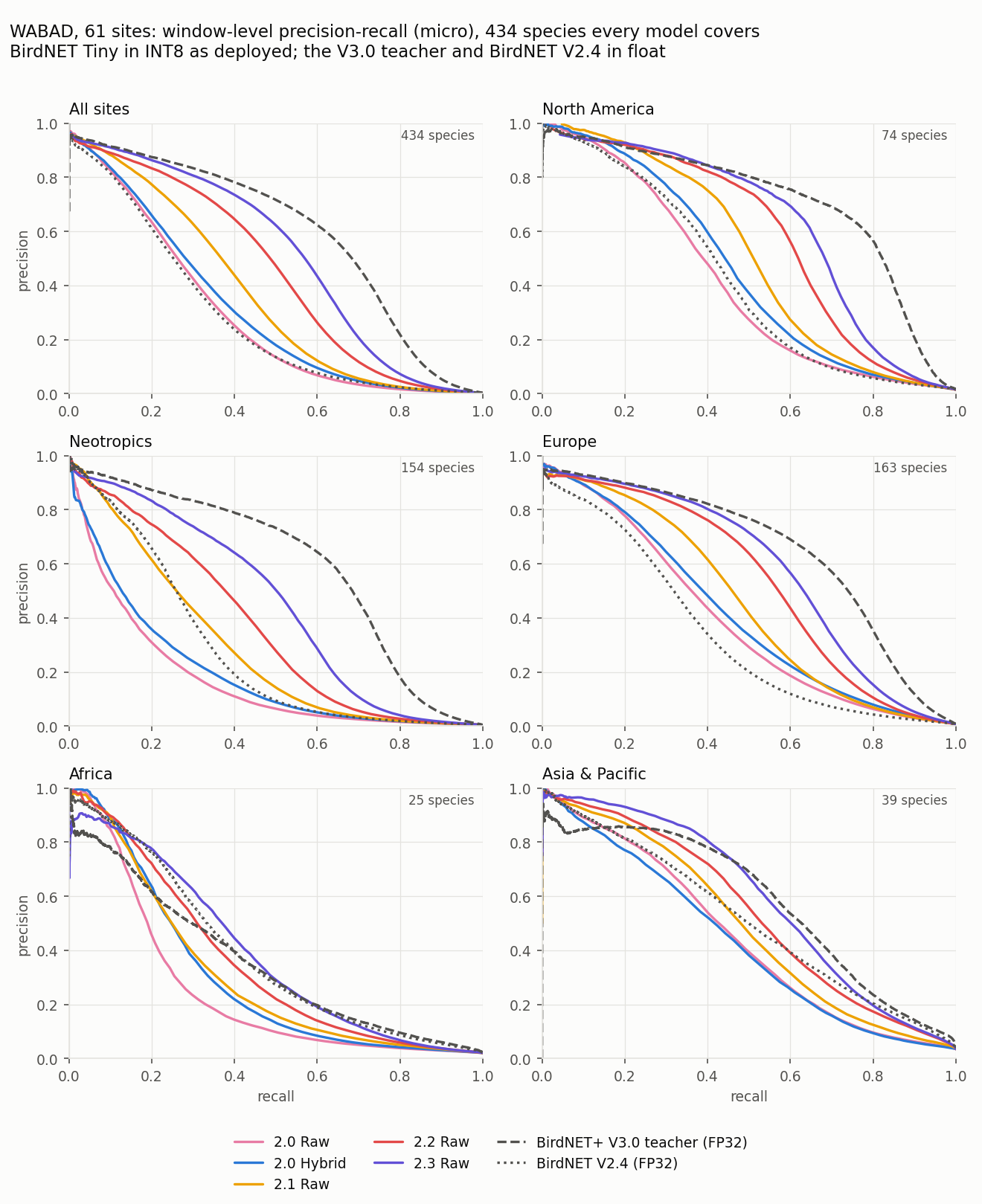
The same comparison as curves: precision against recall over every window-species decision, on the 434 species every plotted model covers, with the BirdNET Tiny models in INT8 as flashed and the two BirdNET references in float. Central and South America share the Neotropics panel, and Asia shares one with Oceania and the Pacific.
The 2.0 models reach about half the teacher's AUPRC at under 1.5% of its parameters. They are strongest in Europe and North America and weakest in the tropics, Asia and Africa. The 2.0 hybrid finds 11% more calls than 2.0 raw (+0.021 AUPRC) and leads in five of the seven regions; it trails in Oceania and is level in Asia. Its lead over raw has grown with the class count: on the 44 northeastern species above it is +0.049 AUPRC, against +0.031 between v1.8 Hybrid and v1.9 Raw.
v2.1 ships a new Raw model only; the hybrid model stays v2.0 Hybrid. v2.1 Raw finds 66% more calls than v2.0 Raw and 50% more than v2.0 Hybrid (+0.074 and +0.053 AUPRC), and more than either in every region; in Africa it logs more calls at 0.5 than the teacher. The largest gains are in the Neotropics: four times 2.0 Raw's recall in Central America and the Caribbean. Two changes made it:
- A wider backbone where 2.0 used its width. Stage widths 48 / 128 / 512 / 1024 against 2.0's 48 / 96 / 192 / 384, with the 1024-d embedding merged into the last stage (2.66 M backbone parameters against 0.90 M), set by how much of each stage's width the 2.0 model actually used. The pointwise kernels are trained without an L2 penalty, which had left a third to half of the wider layers' channels permanently inactive.
- The classifier refit after training on the frozen backbone over every training file, its negatives weighted by geographic co-occurrence (Head fine-tuning). On the INT8 model this adds 4% AUPRC (0.342 → 0.356); the rest is the backbone.
v2.2 ships a new Raw model only. v2.2 Raw finds 46% more calls than v2.1 Raw (+0.089 AUPRC) and more in every region, from +36% in North America to three times 2.1's recall in Oceania and the Pacific; in Africa it logs more calls at 0.5 than the teacher (0.210 against 0.135) at nearly its AUPRC. Three changes made it:
- A new backbone, N6-B0: EfficientNet-B0 with ReLU6 instead of SiLU, no squeeze-and-excite and a bounded residual stream, behind the same frontend at 128 bands into a 1,280-d embedding (3.58 M backbone parameters). B0 as published learned faster still but lost 14% of its WABAD AP to INT8; these three changes keep the gain on the device. See Training.
- Quantization-aware training for two epochs after the head fine-tune (Training), which helps from this release on: QAT had trained on an unbalanced draw and against a probability output the releases do not ship.
- A two-exposure INT8 frontend: the conversion runs the frontend's band mix and compressor as a quiet and a loud path, each on its own INT8 grid, exact in float (Conversion).
INT8 keeps 95.5% of the float AUPRC (0.445 against 0.465 before QAT; 2.1 Raw: 0.356 against about 0.37).
v2.3 ships a new Raw model only. v2.3 Raw finds 36% more calls than v2.2 Raw (+0.065 AUPRC) and more in every region, from +27% in Europe and North America to 2.4 times 2.2's recall in Oceania and the Pacific, where it now logs twice the teacher's calls at 0.5; in Africa it logs 2.4 times the teacher's calls at a higher AUPRC. It also scores higher overall: at 2.2's window precision (0.773, threshold 0.70) it finds 24% more annotated windows, and at 0.5 its window precision is 0.722. Three changes made it:
- A wider N6-B0 (
efficientnet_b0_n6w): expansion 4 in stages 2–4 and the residual stream doubled in stages 4–6 (10.85 M backbone parameters against 3.58 M), where 2.2's N6-B0 used 92–96% of its channels. See Training. - More data where it was short: dataset v0.5.0 adds recordings for the species with the least data, field negatives and confirmed absences, and a species a recording does not name is scored by the teacher alone (the background-bird rule).
- Four epochs of quantization-aware training instead of two: two of warm-up and two of decay, which gave the best INT8 epoch (Training).
INT8 keeps 98.3% of the float AUPRC (0.510 against 0.519 before QAT).
The INT8 conversion sets each activation's range at the 99.999th percentile of its values on the calibration data rather than at its min/max (see Conversion). On this benchmark that took v2.0 Raw from 0.258 to 0.282 AUPRC and from 0.141 to 0.165 event recall at 0.5 — 17% more calls — with no change in size or speed (float model: 0.302 AUPRC).
- Event recall is the share of annotated calls whose overlapping window scored above the threshold — what a recorder set to that threshold would log.
- Window cMAP averages a precision-recall curve per species, so a bird heard twice weighs as much as one heard four hundred times. Window AUPRC pools every window-species decision into one curve, which is closer to what a deployment returns. They move independently, so both are reported: a model can cover the species list well and still miss most of the calls a site produces.
Cost on the device
Measured on an STM32N6570-DK in the firmware's clock profile — CPU, NPU and buses all at 400 MHz, no overdrive, which is ST's profile for nominal core voltage — for one 2.5-second chunk: the firmware reads exactly one chunk per file, computes one frontend and runs one inference. Hybrid rows use the 1.6+ firmware's STFT (33 ms); the firmware of 1.5 and earlier took 69 ms for it.
| Model | Parameters | MACs | NPU | Frontend (M55) | Compute per chunk | NPU epochs |
|---|---|---|---|---|---|---|
..._90_V1.4_Raw_INT8 |
987,156 | 81.34 M | 15 ms | 0 ms | 15 ms | 58 (3 sw) |
..._90_V1.4_Hybrid_INT8 |
946,196 | 104.83 M | 19 ms | 33 ms | 52 ms | 40 (4 sw) |
..._90_V1.5_Raw_INT8 |
987,156 | 81.25 M | 15 ms | 0 ms | 15 ms | 53 (3 sw) |
..._90_V1.5_Hybrid_INT8 |
946,196 | 104.83 M | 19 ms | 33 ms | 52 ms | 40 (4 sw) |
..._90_V1.6_Hybrid_INT8 |
946,196 | 104.83 M | 19 ms | 33 ms | 52 ms | 40 (4 sw) |
..._90_V1.6_Raw_INT8 |
987,156 | 81.25 M | 16 ms | 0 ms | 16 ms | 52 (3 sw) |
..._90_V1.7_Hybrid_INT8 |
946,196 | 104.83 M | 19 ms | 33 ms | 52 ms | 40 (4 sw) |
..._90_V1.7_Raw_INT8 |
1,012,052 | 134.88 M | 21 ms | 0 ms | 21 ms | 54 (3 sw) |
..._90_V1.8_Hybrid_INT8 |
946,196 | 104.83 M | 19 ms | 33 ms | 52 ms | 40 (4 sw) |
..._90_V1.8_Raw_INT8 |
1,003,860 | 151.97 M | 22 ms | 0 ms | 22 ms | 51 (3 sw) |
..._90_V1.9_Raw_INT8 |
1,006,256 | 151.97 M | 22 ms | 0 ms | 22 ms | 51 (3 sw) |
..._1K_V2.0_Raw_INT8 |
1,939,685 | 152.91 M | 22 ms | 0 ms | 22 ms | 49 (2 sw) |
..._1K_V2.0_Hybrid_INT8 |
1,882,021 | 105.76 M | 20 ms | 33 ms | 53 ms | 36 (2 sw) |
..._1K_V2.1_Raw_INT8 |
3,701,957 | 392.11 M | 32 ms | 0 ms | 32 ms | 49 (2 sw) |
..._1K_V2.2_Raw_INT8 |
4,877,013 | 539.27 M | 35 ms | 0 ms | 35 ms | 82 (2 sw) |
..._1K_V2.3_Raw_INT8 |
12,149,045 | 1,194.83 M | 62 ms | 0 ms | 62 ms | 82 (2 sw) |
| BirdNET+ V3.0 preview 3.1 | 135,228,889 | — | — | — | — | — |
The teacher is listed for scale only: 11x the parameters of the largest model here (about 135x those of the 1.x models), 520 MB on disk against 1 to 4 MB, and no device timings because it does not run on this class of hardware at all.
- Raw is the cheap one and that is its whole purpose. Its learned filterbank runs on the NPU, so a chunk costs 22 ms of compute (16 ms before 1.7 computed the filterbank twice and raw moved to 384, then 448 frames). Hybrid computes a 512-point STFT on the Cortex-M55 first, which costs 33 ms with CMSIS-DSP's Helium FFT — more than the inference it feeds — for the accuracy in the table above.
- Compute per chunk excludes reading the audio. The board test also reports 59 ms of SD-card read per chunk, which a deployment does not pay: a recorder's audio arrives from the microphone over DMA, already in RAM. Including it, the test harness measures 81 ms (raw), 92 ms (2.1 Raw), 121 ms (2.2 Raw), 150 ms (2.3 Raw) and 112 ms per file (hybrid).
- NPU epochs are the compiler's scheduling units; the software ones are the input quantize and output dequantize, which have run on the M55 in every release. A shorter raw frontend in 1.5 took raw from 58 epochs to 53, 1.6's kernel split to 52, 1.7's second exposure and 384 frames to 54, and 1.8's 448 frames to 51. 2.0 is compiled with ST Edge AI Core 4.1 and the NPU's epoch controller, which runs the hardware epochs without the CPU between them: its wider backbone takes the same 22 ms (25 ms without the epoch controller).
- 2.0's extra parameters are almost all in the classifier. 1,013 outputs from a 1,024-d embedding are about a million weights; the backbones are 0.9 M (raw) and 0.84 M (hybrid). The INT8 models are 2.2 and 2.1 MB (1.9: 1.2 MB).
- 2.1 spends its extra parameters in the backbone: 2.66 M of its 3.70 M, 2.6x the MACs of 2.0 Raw for 45% more NPU time (32 ms against 22 ms). The INT8 model is 4.0 MB, its weights read from external flash; its activations take the same 945 kB of NPU RAM as 2.0 Raw's, none of it in CPU RAM.
- 2.2's N6-B0 is 1.4x 2.1's MACs for 8% more NPU time (35 ms against 32 ms): 4.88 M parameters, 3.58 M in the backbone, 5.6 MB as INT8. Its activations take 1,751 kB of NPU RAM (2.1: 945 kB), still none in CPU RAM; the two-exposure frontend adds 0.8 ms and every op stays on the NPU.
- 2.3's wider N6-B0 is 2.2x 2.2's MACs for 1.8x the NPU time (62 ms against 35 ms): 12.15 M parameters, 10.85 M in the backbone, 13.2 MB as INT8, its 13.8 MB of weights read from external flash. The wider layers sit after the activation peak, so the activations take the same 1,751 kB of NPU RAM as 2.2's, none in CPU RAM.
- The 2.0 hybrid build nearly fills the application SRAM: code, labels and every buffer share 1 MB, and its 384 KB spectrogram buffer leaves 14 KB free (see Hardware).
- At 22 ms per 2.5 s chunk, raw is 114x faster than real time (2.1 Raw at 32 ms: 78x; 2.2 Raw at 35 ms: 71x; 2.3 Raw at 62 ms: 40x), so duty cycle rather than throughput sets a recorder's power budget.
Running a bundle on the board
Everything the firmware needs is in the bundle; no extra downloads.
- Install the toolchain and create
config.json— see Deployment for ST Edge AI Core, STM32CubeProgrammer, and ARM GNU setup. - Prepare an SD card with test audio — see
SD card preparation. WAV sample rate
must match the
sample_ratein_model_config.json; mismatched files are skipped. -
Compile, flash, and run:
# Wherever the extracted bundle lives; the globs below pick the files out
# of it, so nothing depends on which region or version you downloaded.
BUNDLE=~/Downloads/<bundle>

python -m birdnet_stm32 board-test \
  --model_path    "$BUNDLE"/*_INT8.tflite \
  --model_config  "$BUNDLE"/*_model_config.json \
  --labels        "$BUNDLE"/*_labels.txt
board-test generates the N6-optimized binary with stedgeai, flashes it over
serial, runs inference on every WAV on the SD card, and streams the top
predictions back over UART. Add --save_results results.csv to capture them.
Validating on device
Release bundles do not ship fixed validation inputs. To run stedgeai validate
against a downloaded model, supply your own representative audio — see
Deployment — or re-run
conversion locally to generate a validation set.